
Your Microsoft/Xbox account is your progress, items, profiles, and reputation combined on CraftersMC. Most account thefts in Minecraft communities happen because players are tricked into giving away login details, codes, or one-time passwords to scammers.
How Discord Verification Scams Work
Most scams start on Discord. Scammers create fake Discord servers or bots that claim to offer:- Ranks or rewards
- Giveaways
- "Account verification"
- Trust or security checks
- Your Minecraft or Microsoft email
- Your password
- A one-time code sent to your email
- Or by logging in through a fake verification website
This is an example of a scam Discord server that aims to steal your account.

The bot asks your username and email address to send you a single-use code.

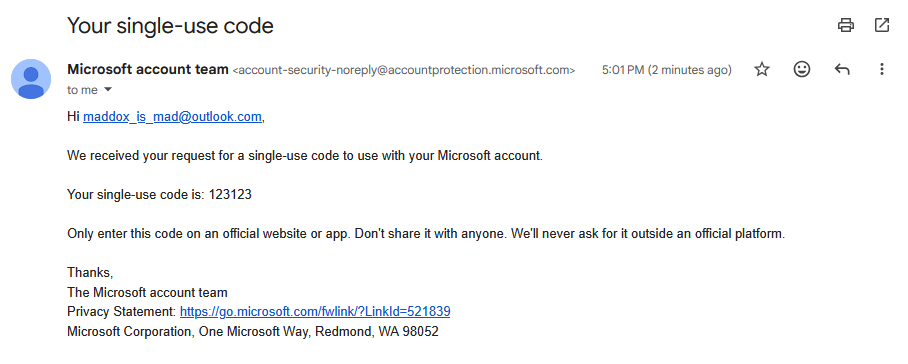
If you enter the single-use code you received in your email address to the bot, your account will be stolen.

The bot asks your username and email address to send you a single-use code.
If you enter the single-use code you received in your email address to the bot, your account will be stolen.
Real servers and real verification systems will never ask for your account password or codes from your email. If a bot or person asks for that, it is a scam.
Important: Microsoft OAuth Can Be Abused
The CraftersMC website (https://craftersmc.net) login uses Microsoft OAuth, which is safe only when used on the official site.When you log in on the CraftersMC website:
- We never see or store your Microsoft password
- We do not gain access to your Microsoft or Minecraft account
- We cannot log in as you
- We do not store, sell, or use your personal data outside of authentication
- We only verify that you are the owner of the account
This is the official OAuth request shown while logging in to the CraftersMC website. As our verified publisher application to Microsoft is pending, it's shown as unverified as well.

In order to check if it's an official CraftersMC OAuth request, check the app creation date and response URLs by clicking on "unverified". The creation date should be July 13th, 2021 and the response URLs should be and https://market.craftersmc.net/giris-yap (for CraftersMC Store for Türkiye before it was shut down).
In order to check if it's an official CraftersMC OAuth request, check the app creation date and response URLs by clicking on "unverified". The creation date should be July 13th, 2021 and the response URLs should be and https://market.craftersmc.net/giris-yap (for CraftersMC Store for Türkiye before it was shut down).
Malicious OAuth Applications
While Microsoft OAuth itself is safe, scammers abuse it by creating malicious third-party applications.If you log in through a fake website and approve its Microsoft login request, you may unknowingly grant that third-party app access to your account. This permission is granted directly through Microsoft and happens the moment you approve the request.
If you log in through one of these and grant permissions, you are not sharing your password, but you are giving the app access to your account. Once permission is granted, scammers can:
- Log into your Minecraft account
- Steal profiles and items
This is an example scam OAuth application that wants your permission to Sign in to your account.

Official CraftersMC Verification Methods
CraftersMC only has two legitimate account verification systems:1. Website Login
- URL: https://craftersmc.net
- Uses official Microsoft OAuth
- Safe only on this exact domain
2. Discord Account Linking
- Official server: https://discord.craftersmc.net (Server ID: 935155928649572352)
- Official Discord bot: Crafters#9900 (App ID: 993616315573092513)
- Requires typing
/discordin-game - You then enter the shown code in the Discord server
- No Microsoft login, no email, no password required
One-Time Passwords and Single-Use Codes
One-time passwords (OTPs), single-use codes or verification codes are meant to prove it is you logging in. They should never be:- Shared with anyone
- Entered into Discord bots
- Entered on third-party websites
If you receive a code you did not request, do not enter it anywhere. It is likely someone attempted to log in and is waiting for you to finish the process for them.
Simple Steps to Stay Safe
1. Use strong and unique passwordsDon't reuse passwords from other sites. A unique password makes it harder for attackers to guess or reuse leaked credentials.
2. Enable Two-Factor Authentication (2FA)
Turn on 2FA for:
- Your Microsoft account
- Your Discord account
- Your email account
3. Never share codes or passwords
No staff member or bot from CraftersMC, Minecraft, Discord, or Microsoft will ask for your login info or codes. If someone does, ignore and report them.
4. Be cautious with Discord servers and links
Only join Discord servers you trust. If a server asks for verification before you can chat or invites you to a verification site, treat it with suspicion.
5. Avoid clicking unknown links
Scam links often look similar to real ones. One wrong letter is enough to lose your account. Always double-check links before clicking.
If You Think Your Account Was Targeted
- Change your Microsoft account password right away.
- Enable 2FA if it wasn't already enabled.
- Review recent login activity on your accounts and log out from any unknown ones.
- Contact Microsoft or Discord support if you lose access.
- Remove any unknown third-party app access on your account by visiting https://microsoft.com/consent.
Always Stay Safe!
Your account security is mostly about awareness.- Do not share your login info.
- Do not enter codes outside official login pages.
- Do not approve Microsoft account access for unknown apps.
